Posts Tagged ‘website’
Politifact
Posted by sshadmand in Technology on August 9th, 2009
I heard about this site while listening to an interview on NPR. In this interview the host asked thier guest some questions as to why “they are so angry” at thier local senator. The guest replied that he is a liar and signed bills to allow a rediculous measure in an unwanted bill. She was irate at the situation, what was interesting is how the host then turned to a guest from Pilitifact who seemed to have researched the case and found taht many of the angry protesters points were driven by rumors as the references to documents they made were unsubstantiated. Now I am perfectly aware that Politifact is yet another level of abstraction from the “real truth” just like any other news agency. What is interesting to me, after I browsed around thier site is the fact that they give you thier opinion and consolidate every reference and statement into linkable sources on the right hand gutter of the web page. It’s like having your own senate secratary gathering the facts for you so you can make your own informed descisions on a topic.
They give a summary of statment or claims made by our politicatns and then exmine their refernces and sources and rate how true the statememnt is on a “truth -o-meter”. Their meter varies from basic true or fals all the way down to “Pants on Fire” for those claims made that are not only exagerated but baseless.
They also show you links to all the references and sources they reveiwed so you can digg into the claims yourself and form your own opinion. The site definitely fills a need and will ecome popular enough so that our politicians are more careful when trying to exagerate claims just to gain the viewers attention. ALso a nice reference for Politifact is thier wininnging of the 2008 pulitzer for national reporting after only being luanched in 2007.
Boxee
Posted by sshadmand in Technology on August 8th, 2009
Isaac just demoed a great peice of software for the mac or PC called Boxee. Boxee is loaded on your computer and plays online video from hundreds of sources including videos from your local hard drive, hulu, youtube, and digg. Simply hook your computer up to your TV and watch these shows and click through options and menus with your remote. Best of all its an open source project so downloading is free and you are able to improve the product or add your own video modukes as you please.
Since Boxee allows you to login to your favorite social networks you can see what friends are watching while you watch and more. The bads: since it’s open source and downloaded software when a web site that boxee pulls from is changed those interfaces in Boxee fail as well until you download a newer build. Its a great tool and relly merges computer with tv experience, definitly a project that has been needed for a long time and meant for the open soure community.
See more about what Boxee can do below:
Balsamiq, an interesting taste of things
Posted by sshadmand in Technology on July 27th, 2009
Balsamiq.com is a web application (that also comes in a downloadable software version) that allows users to quickly create mockups for web sites and iphone products. I was skeptical at first, but 2 things made me pretty happy with thier approach to this common problem.

Mockup
The first was the choice they made to exagerate the concept of fuction over form. Their toolset, or stencils are purposly quasi-poorly hand drawn graphics that have a major lack of attention to detail. As the owners of Balsamiq.com put it, “it encourages critisism” … “so that people don’t get attached to ‘that pretty color gradient’”. The secod thing I liked after playing around with the app a bit was the way they decided to implement the editing process of these draft like stencils. Most implemetations of design toold have properties panels that allow you to change many aspects of a feature, but not only do those properties get complex but since you are given many properties you try to use them in various combinations and often times doing so has unwanted results i.e. certain border style doesnt work well with large boxes with italic text.
At balsamiq.com the stencils are all pre fab and standard, not much is expected of them other then being better then just a place holder. Content is, for the most part, the only thing you can change and they use a simple text edit box when that content needs to be changed. When you double click a stensil the data is presented in a markdow laguage. i.e. buttons that are hard to align and choose width and colors are nothing more then a comma delimited list in edit mode — (button 1, two, and three). When you click of the text box the buttons are created for you.
They truly stuck to the motto of just use the bare essentials and KISS paradigms to set the expctations of the designers and reviews while making the process of creating dead simple. Which in the end created a great mockup tool, allowig you to focus on what you shoud be focusing on ayways — workflow and content placements.
Give it a try @ http://balsamiq.com/demos/mockups/Mockups.html
Give a hoot track your tweets
Posted by sshadmand in Technology on July 22nd, 2009
There are many apis that offer shortening of urls tinyurl.com, tinyurl.cc, bit.ly and many others which have all been useful over the years as services that take a URL like this: http://www.seanshadmand.com/2009/07/18/give-a-hoot-track-your-tweets/ and convert it to a url like this: http://tinyurl.com/len47k. Once the tiny url is clicked a user is quickly redirected to the true url of the site.
Now, with the advent of the Facebook status and more recently Twitter tweets, fitting text based information into a very small space is ever more important and shortening URL’s has become big business and an interesting space to be in for startups these days. (check out some techcrunch articles here at http://bit.ly/jytKD and http://ow.ly/hWSV).
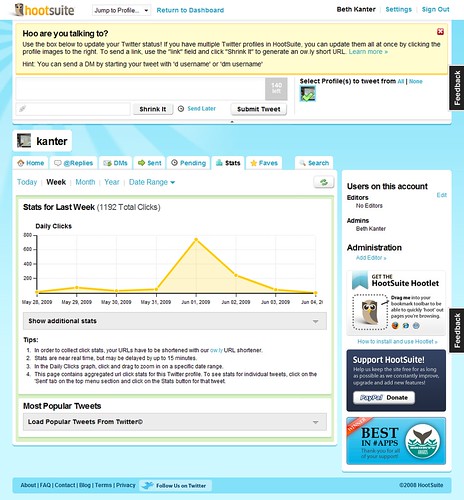
I have recently been turned on to yet another player in the field found at http://ow.ly. This url shortner is provided by a comapny called HootSuite and not only provides shortened urls but aggregates all of your twitter feeds in to one place and allows you to quickly convert all urls within a tweet into shortened ow.ly based urls. The cool thing is those shortened url’s also provide tracking analysis so you can see how many people clicked your link in a line graph inline with all of your posts. Pretty cool, if you twitter at all or can find it usefull to track a urls number of clicks beit through an email or web site give ow.ly or hootsuite a try.
Knol: a Unit of Knowladge
Posted by sshadmand in Technology on July 20th, 2009
Knol (http://knol.google.com/) is a product from Google that allows users to post content about whatever they feel they have expertise in to th web. At first glance I wondered if this would cannabalise blogger or any other form of content publishing Google already has on the market. After diving deeper I realized that knol is between a blog and a wiki. In that it’s not just for posting information in a time line like a journal, although there are plugins to make blogging apps work less like a journal and more like a site, and it isn’t modertated bu some elite “truth finder” entity like a wiki.
About 6 months a go a friend asked mine asked me for some direction when trying to figure out a way to put up what he knew about his local citities night life, as he found many people came to him for suhc data, but he didn’t want it to neessacarily be a blog. A blog in his eyes was to date based and abstract. He wanted a different interaction model that allowed users to dive into specific ascpets of information about going out in his city. Not knowing of Knol at the time I told him the simplest thing to do would be to start writing a blog and if there is traction but some extra time into manipluate the front end to cater more to his needs through stylings and graphics or plugins. So based on that interaction with him then I can see exactly how Know could have an audience to cater to. I offered this tool to him recently and he seemed pretty excited about it. I awat his response on how much better it is then the blog and I’ll be sure to let y’all know what he finds as soon as I get the info myself :)
Augmented reality: Nearest Subway
Posted by sshadmand in Technology on July 18th, 2009
Latest coool app that takes augmented reality and makes it practicle for the everyday user using GPS and the New York City Subway.
Augmented reality uses your screen to superimpose CGI or digital media as an overlay to a real life realtime backdrop. The first big example of comercial use I know was by GE who did thier own version of augemnted rality for thier website. On the site GE asked its users to print a pattern out and hold it up to the camera on thier computer. The site would recognize the pattern and place digital graphics, of a wind mill for instance, on top of that pattern but using the computers camera. They also added an audio feature so that when you blew on the microphone the windmills would start turning. Here are some other exampes of augmeted reality on youtube.
Now the latest augmented reality product is out on iPhone and allows users to not only see the nearest NY metro stops to them but it overlays a marker in realtime over the video functionailty of the camera so that you can see the marer over the landscape in fornt of you. With teh camer faced town arrows are placed on the ground, through the camera, showing you the direction you need to walk to get to the metro of your choice. Check out more iformation and a video on crunch gear showing off how it works here and learn more about the comapny that produced it called AcrossAir here.
Google Voice: A look around
Posted by sshadmand in Technology on July 17th, 2009
Finnaly got the invite tonight from Google Voice, Googles completly free phone forwarding and voice mail service. Google voice is the new version of what was fromerly known as grand central. The servcie lets you choose a phone number and all calls made to that number are forwarded to a number of your choice, be it cell phone, home phone or work. There are a good deal of options and setting that come with this service and overall it seems to be a pretty cool evolution in phone messaging. Phone VM transcription services and magaement systems have been around for years but as usual Google has made this service free now so other small businesses will be hard pressed to beat that bottom line.

GV Phone App
One great feature is the transcription service for all voice mails. When a user calls and leaves a voicemail message Google takes the voice stream and converts it to text. You can then read the voice mail via email, text message, through the Google Voice portal or through the downloaded phone application for Android or Blackberry. The transcription works well pretty well most of the time, although it’s not perfect just yet. Phone numbers were deciphered 100% accuratly, so far at least, and you can always play the voice mail along with the text if you have any problems with the transcription. Also, on the phone app the text is higlighted as the voicemail is read to you. If you want multiple numbers going to and from a single number check out vumber.com for multinumber. Note: There is one place that Google Voice charges, international calls.
As far as anyother charges that one could inccur from the phone network, I called T-Mobile and the representative said that many companies in the VM business have worked payments sytems with phone carriers out to make sure although you aren’t chareged for these services you dont abuse the carriers lines either. Of course rates will vary between plans and carriers so make sure you check your plan for details but in my plan I get 500 forwarding minutes during peak time. If thise minutes get used up then forwarding gets counted against my regular minutes, once again only during peak hours. All in all it would take alot of long messsages to go over those limits so I am happy with both sides of the system so far. I will see at the end of this month if what I was told ends up what i see on my bill..
Also, Daniel tunred me on to some cool settings for GSM phones. You can force your carrier to use a third party VM service so all your calls either through Google Voice or through your own personal exsisting number uses the Google Voice VM service. You can find out how to set that up here (http://go.danielodio.com/voice). Bassically dial *004*1[yourVMservicenumber]# (i.e. *004*15551234#) and all future VM calls will be sent to the VM service phone number provided.
Below are some screen shots of the dash board and settings provided by the Google Voice service.
Dashboard inbox diplsay VM messags and their transcriptions. You can send SMS messages and call from your dashboard as well. If you use gmail all your contacts come along with the dashboard so who is calling is not just a phone number but a name and picture could be associated with each entry.
This cool feature below lets you create VM greetings that change depending on who is calling you. Have a professional greeting for unkown and work contact and a fun one for friends.
Send transcriptions to email or via SMS, screen callers or keep calls from ringing your phoen and going straighth to VM with do not disturb option.
Google also has a widget that lets you put a contact me area on yor page so people can call yo without having to know your direct number.
Don’t even reply

Isaac and Ryan turned me on to this guys blog. Basically he replies to other peoples posts and ads with some off the wall questions and comments. I didnt think it would be that good and ofcourse the premis is jouvinile at best, but some of them gave me a pretty good luagh. Check it out at http://dontevenreply.com/. Here is a tip: I read some outloud to my Mom, which made it 10 times funnier!
Here is a bit of one of the exchanges on this guys blog:
Original ad:
Wanted: ride from philly to rehoboth beach
i am trying to leave any time next friday. i will pay for gas, and provide conversation.i am bringing a large duffel bag and a cat.
From Mike Partlow to ***********@*********.org
Hey,
I have to go to court in Rehoboth next Friday, so I would be able to give you a ride. I just want to know, you’re female, right?
Mike
From chris ******** to Me
i am male. what time did you want to leave?
-chris
From Mike Partlow to chris *********
Chris,
I’m sorry, I thought you were female because you said you owned a cat. Sorry, but I don’t want to give you a ride. Two dudes in a car, going to Rehoboth, it just seems a little gay. Better luck next time.
Mike
[ more of this ] [ home page ]